New Entra ID Migration

Your people first. Then everything else.

Before mailboxes, OneDrive, Teams and SharePoint can move, the users and groups must exist in the new tenant. Entra ID Migration creates them – with their profiles, managers, licenses, owners and members – in minutes, from a CSV or a picker.

  • Tenant to tenant
  • Check before you start
  • Safe to run again
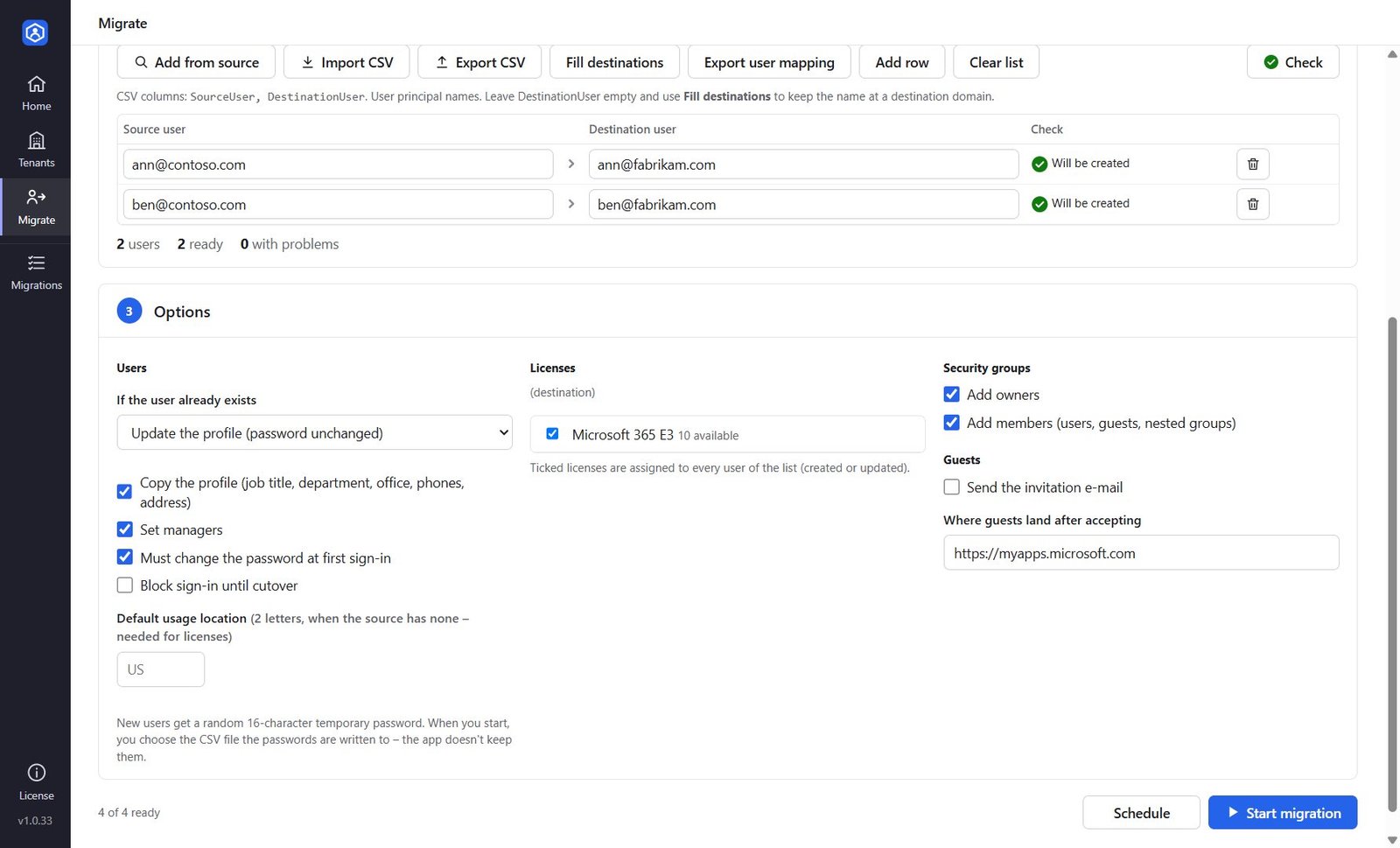
Migrate screen with users checked, license choice and options for users, security groups and guests
Users createdProfile, manager, license
Passwords to your CSVNever kept by the app
Users & managers Security groups Guests (B2B) Licenses User mapping for the next steps
Three lists, one run

Everything a tenant-to-tenant move needs on day one

Add users, security groups and guests from the source tenant or a CSV, press Check to see what will be created, updated or is in the way – then start, or schedule it.

Users

Created in the destination with a new user principal name – Fill destinations swaps the domain in one click. Job title, department, office, phones, address and usage location are copied, managers are set, and the licenses you tick are assigned. Users that already exist are updated, never duplicated.
Security groups

Assigned and dynamic security groups with their description, owners and members – users, guests and nested groups, matched to their new accounts. Dynamic membership rules are copied as they are.

Guests

External partners are invited again in the destination tenant – with or without the invitation e-mail – and added back to the security groups they were in. Guests already invited are left alone.

How it works

Connect, check, migrate

Connect

An Entra ID app registration (App ID) in each tenant, with a client secret or certificate. The app shows which permissions are granted and which feature each one is for.

Check

Every row is checked against both tenants: will it be created or updated, is the domain verified in the destination, does the source user or group exist.

Migrate & hand over

Start now or schedule it. New users' temporary passwords go to a CSV file you choose. Export the user mapping for O365 Migration and SharePoint Migrator.

Report

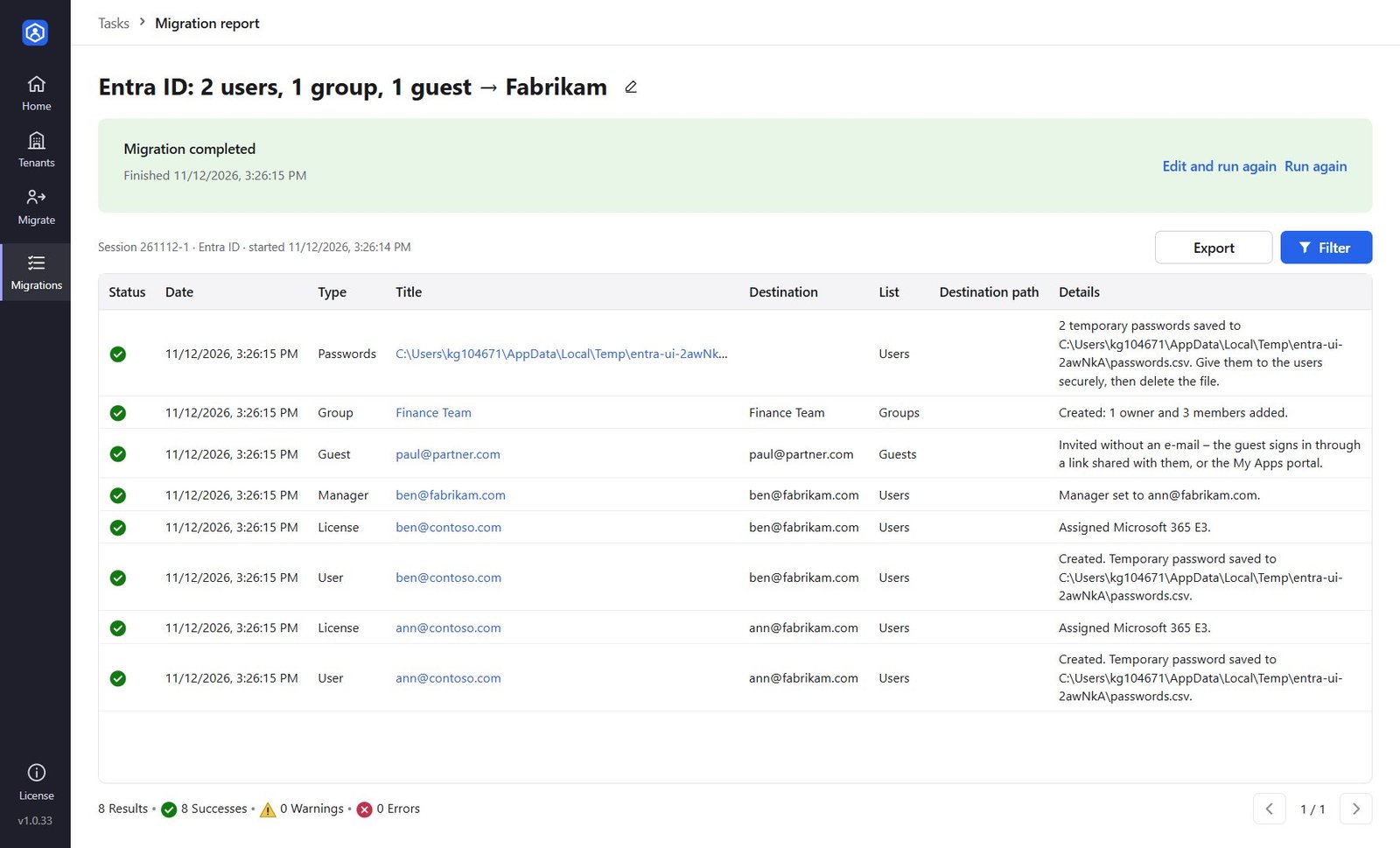
Every user, license, manager and group – one line each

What was created, updated or skipped and why: a domain that isn't verified, no licenses left, a manager who wasn't migrated, a member without a new account. Fix it and run again – only what is missing is added.

  • Run again any time: nothing is created twice
  • Problems in one row never stop the others
  • Export the report to CSV
Migration report with users created, licenses assigned, managers set, a guest invited and a security group with its members
Least privilege

Only the permissions each feature needs

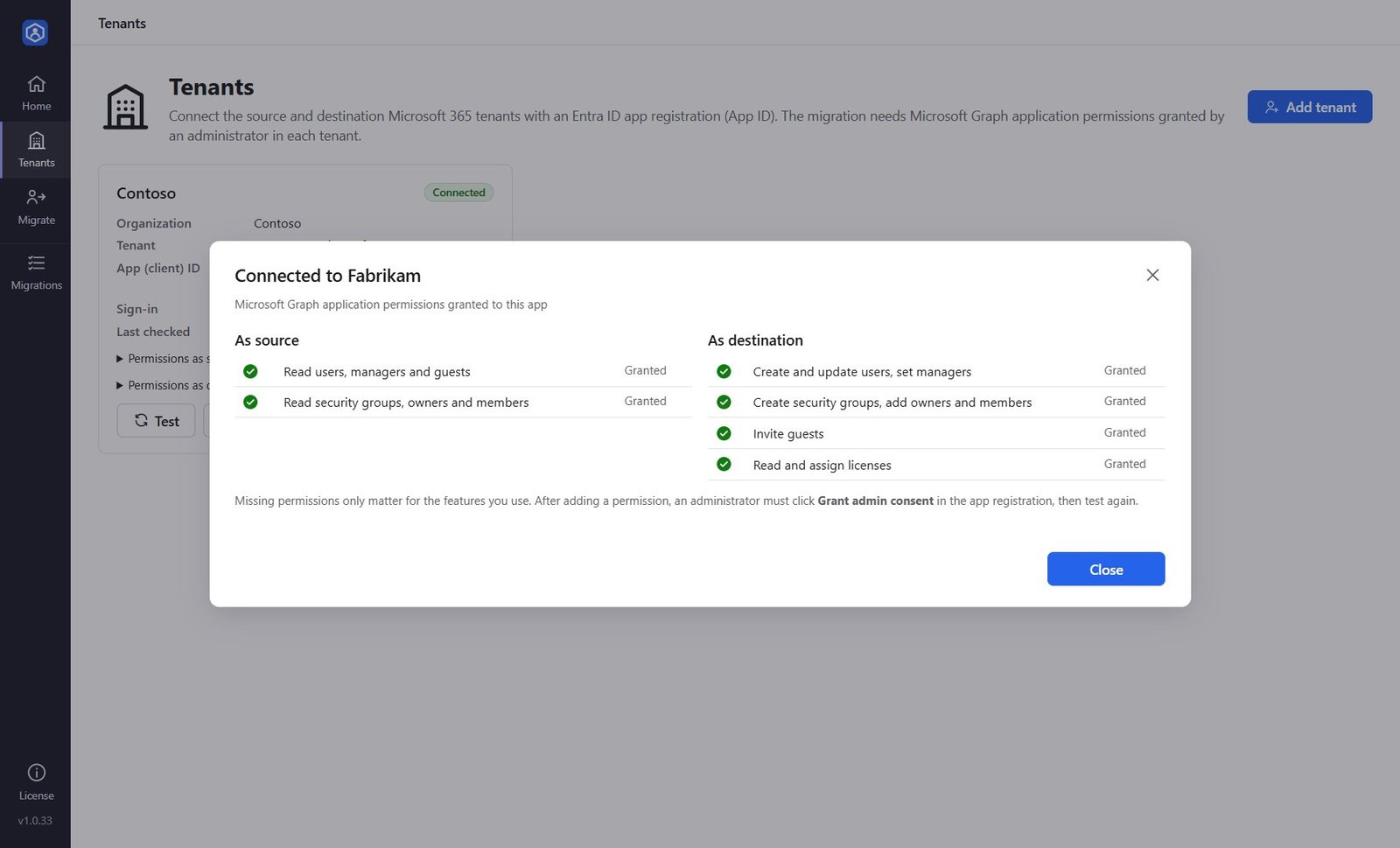
Read-only in the source tenant. In the destination, the app tells you exactly which Microsoft Graph application permission enables users, groups, guests and licenses – and which are missing – before anything runs.

  • Source: User.Read.All and Group.Read.All
  • Secrets encrypted with Windows, never sent anywhere but Microsoft
  • Certificate sign-in supported
Tenant test showing the Microsoft Graph permissions granted as source and destination
Questions

Good to know

What happens to passwords?
Passwords can't be read from Microsoft Entra ID, so every new user gets a strong random 16-character temporary password, by default with "must change at first sign-in". When you start, you choose the CSV file the passwords are written to – the app doesn't keep them and they never appear in the report. Users that already exist keep their password.
Which permissions does it need?
Source tenant: User.Read.All and Group.Read.All (read only). Destination tenant: User.ReadWrite.All to create users and set managers, Group.ReadWrite.All for security groups, User.Invite.All for guests, and Organization.Read.All plus LicenseAssignment.ReadWrite.All for licenses. You only need the ones for the features you use.
What about Microsoft 365 groups, Teams, mailboxes and OneDrive?
Those carry content and are migrated with O365 Migration. Entra ID Migration creates the accounts first and exports a Source → Destination user mapping that O365 Migration and SharePoint Migrator import, so owners, members, authors and permissions land on the right people.
Can I keep the same user names with a new domain?
Yes. Fill destinations keeps the name before the @ and puts a verified domain of the destination tenant after it – jane.doe@contoso.com becomes jane.doe@fabrikam.com. You can also type or import any other name per user. Check warns about domains that aren't verified in the destination yet.
Are dynamic and mail-enabled groups supported?
Dynamic security groups are created with the same membership rule – check that the attributes it uses are filled in the destination. Mail-enabled security groups can only be created in Exchange Online, so they are created as security groups and the report says so.
What does the trial include?
Every feature for 7 days, up to 10 users, groups or guests created. Users and groups that already exist in the destination don't count.